Finding your ISP router's credentials
Sorry, we can't tell you the password for security reasons 🤪
For the past few years, I've been using all the time I don't spend writing new articles setting up a homelab. That includes getting a new small server that I use for home-assistant, a cool access point, a network switch, and of course, my own router. I've also somehow ended up with a 100TB Plex collection now sitting in a data center and thousands of dollars sunk in completely unnecessary hardware for it. I didn't have to do any of these, but once you go down this rabbit hole there's no coming back.
My setup was working great until I had to move to a new apartment and realized that my current ISP couldn't guarantee gigabit speeds there. I was being demoted from gigabit speeds to a mere 100mbps, that's 1/10th the speed I was getting at my old place! You can argue I don't need gigabit but.. I mean I clearly need gigabit. How am I supposed to repeatedly run docker pull xetera/abandoned-project with a measly 100 mbit/s internet?
I started looking around for a new ISP I could switch to, and when I found one that told me my building has fiber support, I learned an important lesson about what "fiber internet" means for ISPs. There's this incredible marketing hype around fiber, as if customers care what material their cables are made of. Every neighborhood is being upgraded to fiber connections, and these ISPs are mentioning incredible technological advancements with it. But what they won't tell you, or will do so reluctantly, is that their fancy new fiber is limited to asymmetric VDSL speeds. 100 mb/s down 10 mb/s up. All these companies seem to have found a way to turn government subsidies and a long term cost-saving investment —laying fiber for new customers instead of copper— into some hype most people don't even understand. I certainly didn't at first.
After some more digging, I saw that an ISP promising gigabit speeds had their flyer hung on my apartment entrance the whole time I was doing my little online hunt, along with the phone number of the fiber manager guy in charge. At that moment, I somehow immediately got over my millenial fear of making phone calls through sheer willpower alone, and rang the guy up. He said he could promise 500mbps speeds, but not anything higher because my apartment had Fiber to the Building (FTTB) meaning there'd have to be a potential long run of ethernet cabling from the ONTs in the basement, reducing top speeds. I'm not sure how I responded to him after that, talking to someone with technical knowledge instead of getting random buzzwords thrown at me left me in a haze. By the next day, the guy and his crew were already over to hook up my internet. Everything was looking great.
Once I had my new internet working, I asked this new “director of fiber internet” how I could go about getting the PPPoE password of the router so I can swap it out with my own router, the way I did with my previous ISP by clicking on a button on their Android app. His response was devastating. "Oh I don't know, they don't even tell me my own router's password. Let me know if you figure out how to find it."
That really scared me since I had no clue if it was even possible to find it. But after some digging and experimenting, I ended up figuring it out later that day.
Mr. Director of Fiber Internet, if you're reading this, here's how.
Changing your router
If you're lucky enough to have an ISP using DOCSIS, you can likely get away with setting your ISP modem to bridge mode and just connect your own router on the other end and everything will just work. Not the case for me unfortunately.
Alternatively, your first option for digging up that password is to just see if your router shows it to you in its Web UI. A lot of ISPs I'm familiar with ship custom firmware with their routers that disable options like custom DNS configuration for censorship reasons. And the ones that don't ship with custom firmware, often have a write-only field for it and don't send the plaintext password to the UI. So I only mention this option in passing. It will probably not work.
You could try to hack the router and use some kind of vulnerability to get access into it and its configuration, but honestly that sounds like a lot of work. Many ISP routers have a management interface usable through the protocol TR-069, but in my experience even if you get access to it, you can only get your username out of it and not the password.
Thankfully, there is a much better third option, which is to MITM the router and find out its juicy secrets. For this, instead of connecting a device you own to your router, you'll be connecting your router to a device you control. But to get there, you'll first need to become familiar with the different protocols used for getting a router online.
PPPoE
With fiber, the ONT authenticates the physical link to the ISP infrastructure. And particularly if you live in a third world country, your ISP uses an ancient protocol called Point-to-Point over Ethernet (PPPoE) for session authentication on top of that.
When your router turns on, it broadcasts a packet in order to discover if there's a PPPoE server on the other end to authenticate itself against. This authentication happens with a username and password, but ISPs often also take the device MAC address into account and won't authorize your device if it's coming from a device they didn't give you. There's almost always going to be a VLAN with specific configuration involved as well. Mine sets the VLAN tag to 0 for example, which is not even in the range of valid VLAN IDs.
Asking for the password politely
There are two ways routers authenticate themselves against whatever they're connected to based on what the server asks for after a session has been established over PPPoE. There's CHAP, where a 3 way handshake between the client and server is used to solve a challenge, similar to what you'd expect from a modern login method. In contrast there's PAP, where your device essentially yells all of its secrets into the void and hopes nobody is listening. Similar to a dispute between two cavemen in 1200 B.C (around when PPPoE was first created). This is what we'll use to find the password. Don't get it twisted though, this is an ancient protocol which means CHAP is barely better than PAP. Yes the challenge includes a salt and makes rainbow tables unusable but it uses MD5 (and sometimes DES)! Even if your router uses CHAP, the password can easily be cracked by modern hardware.
I actually don't think the latter is necessarily dangerous even though it's obviously insecure. You need to have physical access to a router to do any damage and, as far as I know, there aren't many recorded cases of customers getting their devices hijacked through this route. Which makes me even angrier that ISPs say they can't give you that password for safety purposes. Bullshit.
Let's connect the router to the computer you're running. An important thing to note is you NEED to have a PPPoE server running on the other end to get to the point where your router is ready to log in and expose its credentials. Otherwise you'll only see packets where the router is looking for a server and nothing more. If you can't do this, read until the end for an automated tool that does all of it for you.
I already have an external router running pfsense, so I've connected the ISP router to the igc3 interface on my pfsense machine. If you're also a pfsense user, you can tell which interface you've connected to by going
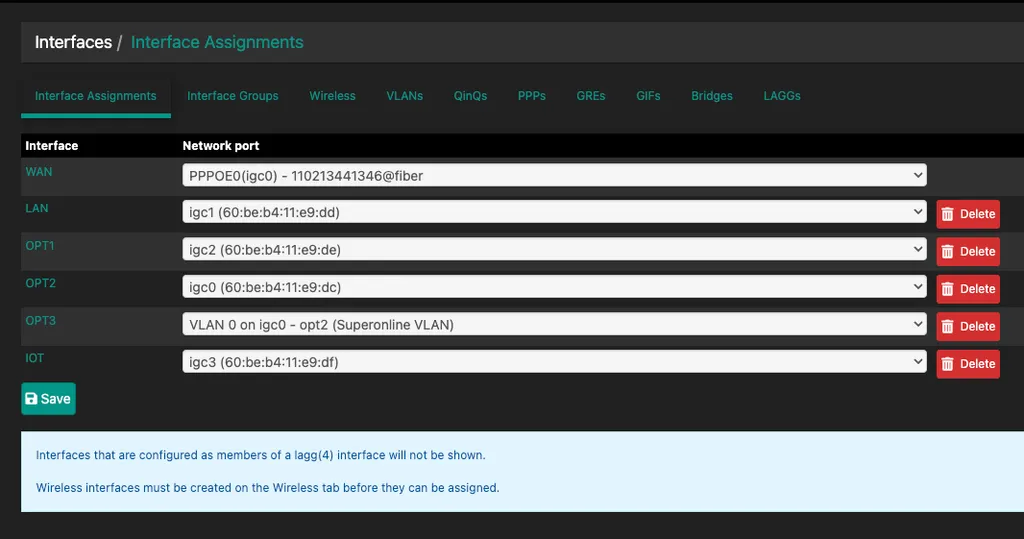
Before the router powers up, we want to already be dumping all the network communication on that interface with wireshark. Assuming you already have ssh access to your machine, running this command lets us pipe tcpdump into wireshark and take a look under the hood.
wireshark -k -i <(ssh root@10.0.0.1 tcpdump -i igc3 -U -w -)I personally use 10.0.0.0/8 for my home subnet because I'm awesome. If you haven't done this kind of thing before or don't know what a subnet is, you're most likely set up with 192.168.1.1 by default.
After powering on the router and waiting a bit for it to wake up, we should start seeing PADI packets that the router sends to initiate the PPPoE handshake. We haven't set up a PPPoE server on the other side yet so these packets falls into the void with no response. Most routers are set up to retry discovery to prevent falling into a do-nothing state. In my case, you can see it retries every 30 seconds.
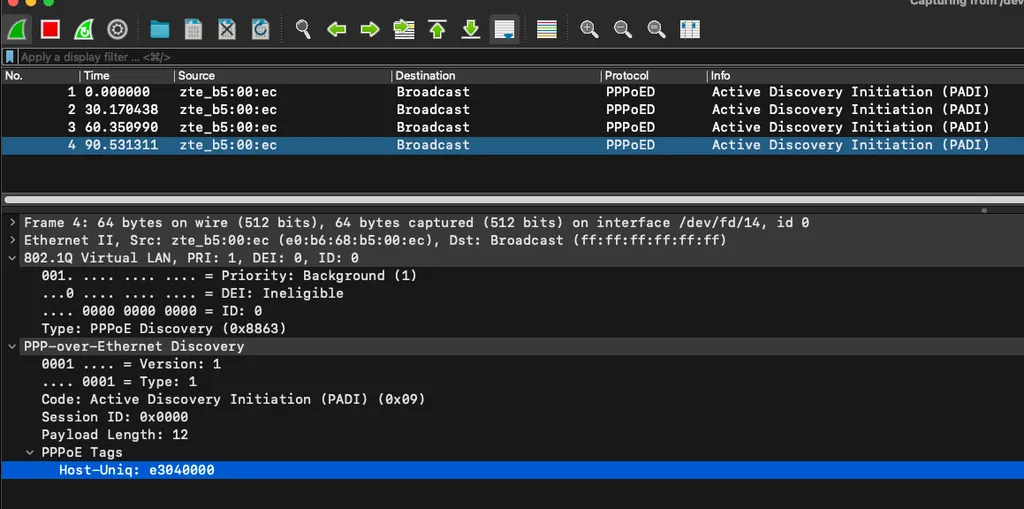
Here's what the steps of an average conversation over PPPoE looks like:
PADIYour router's broadcast over the network it's connected to see if there's a server out there.PADOThe server response to the broadcast. This is basically the pong to the router's ping that contains extra information like the name of the server, and a session cookie used to keep track of the conversation.PADRThe request your router sends to establish a connection using the existing session it received from the previous step.PADSThe server acknowledgement ofPADRpackets. After this step your server can start sending PPP configuration packets to negotiate the settings that will be used to go online.PADTThe termination packet. I've seen one of my routers sending this before sending aPADIpacket, probably to make sure any potentially existing sessions are dropped? It can also be sent by the server if they want to take you offline for whatever reason.
Here's a full interactive wireshark exchange between the router and the PPPoE server.
| Time | Source | Destination | Protocol | Info |
|---|---|---|---|---|
| 0.000000000 | TPLink_04:cf:02 | Ericsson_91:a9:ba | PPPoED | Active Discovery Terminate (PADT) |
Frame 1, 60 bytes on wire on interface /dev/fd/14Interface id: 0 (/dev/fd/14)Encapsulation type: Ethernet (1)Arrival Time: Aug 4, 2024 04:02:22.173280000 +03UTC Arrival Time: Aug 4, 2024 01:02:22.173280000 UTCFrame number: 1Frame Length: 60 bytes (480 bits)Capture Length: 60 bytes (480 bits) Ethernet II, Src: TPLink_04:cf:02 (78:8c:b5:04:cf:02) Dst: Ericsson_91:a9:ba (34:6e:9d:91:a9:ba)Destination: Ericsson_91:a9:ba (34:6e:9d:91:a9:ba)Source: TPLink_04:cf:02 (78:8c:b5:04:cf:02)Type: 802.1Q Virtual LAN (0x8100) 802.1Q Virtual LAN, PRI: 0, DEI: 0, ID: 35000. .... .... .... = Priority: Best Effort (default) 0...0 .... .... .... = DEI: Ineligible.... 0000 0010 0011 = ID: 35 PPP-over-Ethernet Discovery0001 .... = Version: 1.... 0001 = Type: 1Code: Active Discovery Terminate (PADT) (0xa7)Session ID: 0x000aPayload Length: 0 PPPoE Tags | ||||
| 0.000392000 | TPLink_04:cf:02 | Broadcast | PPPoED | Active Discovery Initiation (PADI) |
Frame 2, 60 bytes on wire on interface /dev/fd/14Interface id: 0 (/dev/fd/14)Encapsulation type: Ethernet (1)Arrival Time: Aug 4, 2024 04:02:22.173672000 +03UTC Arrival Time: Aug 4, 2024 01:02:22.173672000 UTCFrame number: 2Frame Length: 60 bytes (480 bits)Capture Length: 60 bytes (480 bits) Ethernet II, Src: TPLink_04:cf:02 (78:8c:b5:04:cf:02) Dst: Broadcast (ff:ff:ff:ff:ff:ff)Destination: Broadcast (ff:ff:ff:ff:ff:ff)Source: TPLink_04:cf:02 (78:8c:b5:04:cf:02)Type: 802.1Q Virtual LAN (0x8100) 802.1Q Virtual LAN, PRI: 0, DEI: 0, ID: 35000. .... .... .... = Priority: Best Effort (default) 0...0 .... .... .... = DEI: Ineligible.... 0000 0010 0011 = ID: 35 PPP-over-Ethernet Discovery0001 .... = Version: 1.... 0001 = Type: 1Code: Active Discovery Initiation (PADI) (0x09)Session ID: 0x0000Payload Length: 12 PPPoE TagsHost-Uniq: 1a:12:00:00 | ||||
| 0.000590000 | SBluetech_11:e9:df | TPLink_04:cf:02 | PPPoED | Active Discovery Offer (PADO) AC-Name='pfSense.home.arpa' |
Frame 3, 74 bytes on wire on interface /dev/fd/14Interface id: 0 (/dev/fd/14)Encapsulation type: Ethernet (1)Arrival Time: Aug 4, 2024 04:02:22.173870000 +03UTC Arrival Time: Aug 4, 2024 01:02:22.173870000 UTCFrame number: 3Frame Length: 74 bytes (592 bits)Capture Length: 74 bytes (592 bits) Ethernet II, Src: SBluetech_11:e9:df (60:be:b4:11:e9:df) Dst: TPLink_04:cf:02 (78:8c:b5:04:cf:02)Destination: TPLink_04:cf:02 (78:8c:b5:04:cf:02)Source: SBluetech_11:e9:df (60:be:b4:11:e9:df)Type: 802.1Q Virtual LAN (0x8100) 802.1Q Virtual LAN, PRI: 0, DEI: 0, ID: 35000. .... .... .... = Priority: Best Effort (default) 0...0 .... .... .... = DEI: Ineligible.... 0000 0010 0011 = ID: 35 PPP-over-Ethernet Discovery0001 .... = Version: 1.... 0001 = Type: 1Code: Active Discovery Offer (PADO) (0x07)Session ID: 0x0000Payload Length: 50 PPPoE TagsAC-Name: pfSense.home.arpaService-Name: *Host-Uniq: 1a:12:00:00AC-Cookie: 00:68:6f:60:00:f8:ff:ff | ||||
| 0.000994000 | TPLink_04:cf:02 | SBluetech_11:e9:df | PPPoED | Active Discovery Request (PADR) |
Frame 4, 60 bytes on wire on interface /dev/fd/14Interface id: 0 (/dev/fd/14)Encapsulation type: Ethernet (1)Arrival Time: Aug 4, 2024 04:02:22.174274000 +03UTC Arrival Time: Aug 4, 2024 01:02:22.174274000 UTCFrame number: 4Frame Length: 60 bytes (480 bits)Capture Length: 60 bytes (480 bits) Ethernet II, Src: TPLink_04:cf:02 (78:8c:b5:04:cf:02) Dst: SBluetech_11:e9:df (60:be:b4:11:e9:df)Destination: SBluetech_11:e9:df (60:be:b4:11:e9:df)Source: TPLink_04:cf:02 (78:8c:b5:04:cf:02)Type: 802.1Q Virtual LAN (0x8100) 802.1Q Virtual LAN, PRI: 0, DEI: 0, ID: 35000. .... .... .... = Priority: Best Effort (default) 0...0 .... .... .... = DEI: Ineligible.... 0000 0010 0011 = ID: 35 PPP-over-Ethernet Discovery0001 .... = Version: 1.... 0001 = Type: 1Code: Active Discovery Request (PADR) (0x19)Session ID: 0x0000Payload Length: 24 PPPoE TagsHost-Uniq: 1a:12:00:00AC-Cookie: 00:68:6f:60:00:f8:ff:ff | ||||
| 0.001034000 | SBluetech_11:e9:df | TPLink_04:cf:02 | PPPoED | Active Discovery Session-confirmation (PADS) AC-Name='pfSense.home.arpa' |
Frame 5, 69 bytes on wire on interface /dev/fd/14Interface id: 0 (/dev/fd/14)Encapsulation type: Ethernet (1)Arrival Time: Aug 4, 2024 04:02:22.174314000 +03UTC Arrival Time: Aug 4, 2024 01:02:22.174314000 UTCFrame number: 5Frame Length: 69 bytes (552 bits)Capture Length: 69 bytes (552 bits) Ethernet II, Src: SBluetech_11:e9:df (60:be:b4:11:e9:df) Dst: TPLink_04:cf:02 (78:8c:b5:04:cf:02)Destination: TPLink_04:cf:02 (78:8c:b5:04:cf:02)Source: SBluetech_11:e9:df (60:be:b4:11:e9:df)Type: 802.1Q Virtual LAN (0x8100) 802.1Q Virtual LAN, PRI: 0, DEI: 0, ID: 35000. .... .... .... = Priority: Best Effort (default) 0...0 .... .... .... = DEI: Ineligible.... 0000 0010 0011 = ID: 35 PPP-over-Ethernet Discovery0001 .... = Version: 1.... 0001 = Type: 1Code: Active Discovery Session-confirmation (PADS) (0x65)Session ID: 0x0007Payload Length: 45 PPPoE TagsAC-Name: pfSense.home.arpaHost-Uniq: 1a:12:00:00AC-Cookie: 00:68:6f:60:00:f8:ff:ff | ||||
| 0.001112000 | SBluetech_11:e9:df | TPLink_04:cf:02 | PPP LCP | Configuration Request |
Frame 6, 46 bytes on wire on interface /dev/fd/14Interface id: 0 (/dev/fd/14)Encapsulation type: Ethernet (1)Arrival Time: Aug 4, 2024 04:02:22.174392000 +03UTC Arrival Time: Aug 4, 2024 01:02:22.174392000 UTCFrame number: 6Frame Length: 46 bytes (368 bits)Capture Length: 46 bytes (368 bits) Ethernet II, Src: SBluetech_11:e9:df (60:be:b4:11:e9:df) Dst: TPLink_04:cf:02 (78:8c:b5:04:cf:02)Destination: TPLink_04:cf:02 (78:8c:b5:04:cf:02)Source: SBluetech_11:e9:df (60:be:b4:11:e9:df)Type: 802.1Q Virtual LAN (0x8100) 802.1Q Virtual LAN, PRI: 0, DEI: 0, ID: 35000. .... .... .... = Priority: Best Effort (default) 0...0 .... .... .... = DEI: Ineligible.... 0000 0010 0011 = ID: 35 PPP-over-Ethernet Session0001 .... = Version: 1.... 0001 = Type: 1Code: Session Data (0x00)Session ID: 0x0007 Point-to-Point ProtocolType: Link Control Protocol (0xc021) PPP Link Control ProtocolCode: Configuration Request (1)Identifier: 1 (1)Length: 20 Options: (16 bytes), Protocol Field Compression, Maximum Receive Unit, Magic Number, Authentication ProtocolProtocol Field CompressionType: Protocol Field Compression (7)Length: 2 Maximum Receive Unit: 1492Type: Maximum Receive Units (1)Length: 4Maximum Receive Unit: 1492 Magic Number: 0x3b67d5b0Type: Magic Number (5)Length: 6Magic Number: 0x3b67d5b0 Authentication Protocol: Password Authentication Protocol 0xc023Type: Authentication Protocol (3)Length: 4Authentication Protocol: Password Authentication Protocol 0xc023 | ||||
| 0.004942000 | TPLink_04:cf:02 | SBluetech_11:e9:df | PPP LCP | Configuration Request |
Frame 7, 60 bytes on wire on interface /dev/fd/14Interface id: 0 (/dev/fd/14)Encapsulation type: Ethernet (1)Arrival Time: Aug 4, 2024 04:02:22.178222000 +03UTC Arrival Time: Aug 4, 2024 01:02:22.178222000 UTCFrame number: 7Frame Length: 60 bytes (480 bits)Capture Length: 60 bytes (480 bits) Ethernet II, Src: TPLink_04:cf:02 (78:8c:b5:04:cf:02) Dst: SBluetech_11:e9:df (60:be:b4:11:e9:df)Destination: SBluetech_11:e9:df (60:be:b4:11:e9:df)Source: TPLink_04:cf:02 (78:8c:b5:04:cf:02)Type: 802.1Q Virtual LAN (0x8100) 802.1Q Virtual LAN, PRI: 0, DEI: 0, ID: 35000. .... .... .... = Priority: Best Effort (default) 0...0 .... .... .... = DEI: Ineligible.... 0000 0010 0011 = ID: 35 PPP-over-Ethernet Session0001 .... = Version: 1.... 0001 = Type: 1Code: Session Data (0x00)Session ID: 0x0007 Point-to-Point ProtocolType: Link Control Protocol (0xc021) PPP Link Control ProtocolCode: Configuration Request (1)Identifier: 1 (1)Length: 14 Options: (10 bytes), Maximum Receive Unit, Magic NumberMaximum Receive Unit: 1492Type: Maximum Receive Units (1)Length: 4Maximum Receive Unit: 1492 Magic Number: 0x1b983c97Type: Magic Number (5)Length: 6Magic Number: 0x1b983c97 | ||||
| 0.005074000 | SBluetech_11:e9:df | TPLink_04:cf:02 | PPP LCP | Configuration Ack |
Frame 8, 40 bytes on wire on interface /dev/fd/14Interface id: 0 (/dev/fd/14)Encapsulation type: Ethernet (1)Arrival Time: Aug 4, 2024 04:02:22.178354000 +03UTC Arrival Time: Aug 4, 2024 01:02:22.178354000 UTCFrame number: 8Frame Length: 40 bytes (320 bits)Capture Length: 40 bytes (320 bits) Ethernet II, Src: SBluetech_11:e9:df (60:be:b4:11:e9:df) Dst: TPLink_04:cf:02 (78:8c:b5:04:cf:02)Destination: TPLink_04:cf:02 (78:8c:b5:04:cf:02)Source: SBluetech_11:e9:df (60:be:b4:11:e9:df)Type: 802.1Q Virtual LAN (0x8100) 802.1Q Virtual LAN, PRI: 0, DEI: 0, ID: 35000. .... .... .... = Priority: Best Effort (default) 0...0 .... .... .... = DEI: Ineligible.... 0000 0010 0011 = ID: 35 PPP-over-Ethernet Session0001 .... = Version: 1.... 0001 = Type: 1Code: Session Data (0x00)Session ID: 0x0007 Point-to-Point ProtocolType: Link Control Protocol (0xc021) PPP Link Control ProtocolCode: Configuration Ack (2)Identifier: 1 (1)Length: 14 Options: (10 bytes), Maximum Receive Unit, Magic NumberMaximum Receive Unit: 1492Type: Maximum Receive Units (1)Length: 4Maximum Receive Unit: 1492 Magic Number: 0x1b983c97Type: Magic Number (5)Length: 6Magic Number: 0x1b983c97 | ||||
| 2.001803000 | SBluetech_11:e9:df | TPLink_04:cf:02 | PPP LCP | Configuration Request |
Frame 9, 46 bytes on wire on interface /dev/fd/14Interface id: 0 (/dev/fd/14)Encapsulation type: Ethernet (1)Arrival Time: Aug 4, 2024 04:02:24.175083000 +03UTC Arrival Time: Aug 4, 2024 01:02:24.175083000 UTCFrame number: 9Frame Length: 46 bytes (368 bits)Capture Length: 46 bytes (368 bits) Ethernet II, Src: SBluetech_11:e9:df (60:be:b4:11:e9:df) Dst: TPLink_04:cf:02 (78:8c:b5:04:cf:02)Destination: TPLink_04:cf:02 (78:8c:b5:04:cf:02)Source: SBluetech_11:e9:df (60:be:b4:11:e9:df)Type: 802.1Q Virtual LAN (0x8100) 802.1Q Virtual LAN, PRI: 0, DEI: 0, ID: 35000. .... .... .... = Priority: Best Effort (default) 0...0 .... .... .... = DEI: Ineligible.... 0000 0010 0011 = ID: 35 PPP-over-Ethernet Session0001 .... = Version: 1.... 0001 = Type: 1Code: Session Data (0x00)Session ID: 0x0007 Point-to-Point ProtocolType: Link Control Protocol (0xc021) PPP Link Control ProtocolCode: Configuration Request (1)Identifier: 2 (2)Length: 20 Options: (16 bytes), Protocol Field Compression, Maximum Receive Unit, Magic Number, Authentication ProtocolProtocol Field CompressionType: Protocol Field Compression (7)Length: 2 Maximum Receive Unit: 1492Type: Maximum Receive Units (1)Length: 4Maximum Receive Unit: 1492 Magic Number: 0x3b67d5b0Type: Magic Number (5)Length: 6Magic Number: 0x3b67d5b0 Authentication Protocol: Password Authentication Protocol 0xc023Type: Authentication Protocol (3)Length: 4Authentication Protocol: Password Authentication Protocol 0xc023 | ||||
| 2.002651000 | TPLink_04:cf:02 | SBluetech_11:e9:df | PPP LCP | Configuration Reject |
Frame 10, 60 bytes on wire on interface /dev/fd/14Interface id: 0 (/dev/fd/14)Encapsulation type: Ethernet (1)Arrival Time: Aug 4, 2024 04:02:24.175931000 +03UTC Arrival Time: Aug 4, 2024 01:02:24.175931000 UTCFrame number: 10Frame Length: 60 bytes (480 bits)Capture Length: 60 bytes (480 bits) Ethernet II, Src: TPLink_04:cf:02 (78:8c:b5:04:cf:02) Dst: SBluetech_11:e9:df (60:be:b4:11:e9:df)Destination: SBluetech_11:e9:df (60:be:b4:11:e9:df)Source: TPLink_04:cf:02 (78:8c:b5:04:cf:02)Type: 802.1Q Virtual LAN (0x8100) 802.1Q Virtual LAN, PRI: 0, DEI: 0, ID: 35000. .... .... .... = Priority: Best Effort (default) 0...0 .... .... .... = DEI: Ineligible.... 0000 0010 0011 = ID: 35 PPP-over-Ethernet Session0001 .... = Version: 1.... 0001 = Type: 1Code: Session Data (0x00)Session ID: 0x0007 Point-to-Point ProtocolType: Link Control Protocol (0xc021) PPP Link Control ProtocolCode: Configuration Reject (4)Identifier: 2 (2)Length: 6 Options: (2 bytes), Protocol Field CompressionProtocol Field CompressionType: Protocol Field Compression (7)Length: 2 | ||||
| 2.002739000 | SBluetech_11:e9:df | TPLink_04:cf:02 | PPP LCP | Configuration Request |
Frame 11, 44 bytes on wire on interface /dev/fd/14Interface id: 0 (/dev/fd/14)Encapsulation type: Ethernet (1)Arrival Time: Aug 4, 2024 04:02:24.176019000 +03UTC Arrival Time: Aug 4, 2024 01:02:24.176019000 UTCFrame number: 11Frame Length: 44 bytes (352 bits)Capture Length: 44 bytes (352 bits) Ethernet II, Src: SBluetech_11:e9:df (60:be:b4:11:e9:df) Dst: TPLink_04:cf:02 (78:8c:b5:04:cf:02)Destination: TPLink_04:cf:02 (78:8c:b5:04:cf:02)Source: SBluetech_11:e9:df (60:be:b4:11:e9:df)Type: 802.1Q Virtual LAN (0x8100) 802.1Q Virtual LAN, PRI: 0, DEI: 0, ID: 35000. .... .... .... = Priority: Best Effort (default) 0...0 .... .... .... = DEI: Ineligible.... 0000 0010 0011 = ID: 35 PPP-over-Ethernet Session0001 .... = Version: 1.... 0001 = Type: 1Code: Session Data (0x00)Session ID: 0x0007 Point-to-Point ProtocolType: Link Control Protocol (0xc021) PPP Link Control ProtocolCode: Configuration Request (1)Identifier: 3 (3)Length: 18 Options: (14 bytes), Maximum Receive Unit, Magic Number, Authentication ProtocolMaximum Receive Unit: 1492Type: Maximum Receive Units (1)Length: 4Maximum Receive Unit: 1492 Magic Number: 0x3b67d5b0Type: Magic Number (5)Length: 6Magic Number: 0x3b67d5b0 Authentication Protocol: Password Authentication Protocol 0xc023Type: Authentication Protocol (3)Length: 4Authentication Protocol: Password Authentication Protocol 0xc023 | ||||
| 2.003365000 | TPLink_04:cf:02 | SBluetech_11:e9:df | PPP LCP | Configuration Ack |
Frame 12, 60 bytes on wire on interface /dev/fd/14Interface id: 0 (/dev/fd/14)Encapsulation type: Ethernet (1)Arrival Time: Aug 4, 2024 04:02:24.176645000 +03UTC Arrival Time: Aug 4, 2024 01:02:24.176645000 UTCFrame number: 12Frame Length: 60 bytes (480 bits)Capture Length: 60 bytes (480 bits) Ethernet II, Src: TPLink_04:cf:02 (78:8c:b5:04:cf:02) Dst: SBluetech_11:e9:df (60:be:b4:11:e9:df)Destination: SBluetech_11:e9:df (60:be:b4:11:e9:df)Source: TPLink_04:cf:02 (78:8c:b5:04:cf:02)Type: 802.1Q Virtual LAN (0x8100) 802.1Q Virtual LAN, PRI: 0, DEI: 0, ID: 35000. .... .... .... = Priority: Best Effort (default) 0...0 .... .... .... = DEI: Ineligible.... 0000 0010 0011 = ID: 35 PPP-over-Ethernet Session0001 .... = Version: 1.... 0001 = Type: 1Code: Session Data (0x00)Session ID: 0x0007 Point-to-Point ProtocolType: Link Control Protocol (0xc021) PPP Link Control ProtocolCode: Configuration Ack (2)Identifier: 3 (3)Length: 18 Options: (14 bytes), Maximum Receive Unit, Magic Number, Authentication ProtocolMaximum Receive Unit: 1492Type: Maximum Receive Units (1)Length: 4Maximum Receive Unit: 1492 Magic Number: 0x3b67d5b0Type: Magic Number (5)Length: 6Magic Number: 0x3b67d5b0 Authentication Protocol: Password Authentication Protocol 0xc023Type: Authentication Protocol (3)Length: 4Authentication Protocol: Password Authentication Protocol 0xc023 | ||||
| 2.003765000 | TPLink_04:cf:02 | SBluetech_11:e9:df | PPP LCP | Echo Request |
Frame 13, 60 bytes on wire on interface /dev/fd/14Interface id: 0 (/dev/fd/14)Encapsulation type: Ethernet (1)Arrival Time: Aug 4, 2024 04:02:24.177045000 +03UTC Arrival Time: Aug 4, 2024 01:02:24.177045000 UTCFrame number: 13Frame Length: 60 bytes (480 bits)Capture Length: 60 bytes (480 bits) Ethernet II, Src: TPLink_04:cf:02 (78:8c:b5:04:cf:02) Dst: SBluetech_11:e9:df (60:be:b4:11:e9:df)Destination: SBluetech_11:e9:df (60:be:b4:11:e9:df)Source: TPLink_04:cf:02 (78:8c:b5:04:cf:02)Type: 802.1Q Virtual LAN (0x8100) 802.1Q Virtual LAN, PRI: 0, DEI: 0, ID: 35000. .... .... .... = Priority: Best Effort (default) 0...0 .... .... .... = DEI: Ineligible.... 0000 0010 0011 = ID: 35 PPP-over-Ethernet Session0001 .... = Version: 1.... 0001 = Type: 1Code: Session Data (0x00)Session ID: 0x0007 Point-to-Point ProtocolType: Link Control Protocol (0xc021) PPP Link Control ProtocolCode: Echo Request (9)Identifier: 0 (0)Length: 8 | ||||
| 2.003785000 | SBluetech_11:e9:df | TPLink_04:cf:02 | PPP LCP | Echo Reply |
Frame 14, 34 bytes on wire on interface /dev/fd/14Interface id: 0 (/dev/fd/14)Encapsulation type: Ethernet (1)Arrival Time: Aug 4, 2024 04:02:24.177065000 +03UTC Arrival Time: Aug 4, 2024 01:02:24.177065000 UTCFrame number: 14Frame Length: 34 bytes (272 bits)Capture Length: 34 bytes (272 bits) Ethernet II, Src: SBluetech_11:e9:df (60:be:b4:11:e9:df) Dst: TPLink_04:cf:02 (78:8c:b5:04:cf:02)Destination: TPLink_04:cf:02 (78:8c:b5:04:cf:02)Source: SBluetech_11:e9:df (60:be:b4:11:e9:df)Type: 802.1Q Virtual LAN (0x8100) 802.1Q Virtual LAN, PRI: 0, DEI: 0, ID: 35000. .... .... .... = Priority: Best Effort (default) 0...0 .... .... .... = DEI: Ineligible.... 0000 0010 0011 = ID: 35 PPP-over-Ethernet Session0001 .... = Version: 1.... 0001 = Type: 1Code: Session Data (0x00)Session ID: 0x0007 Point-to-Point ProtocolType: Link Control Protocol (0xc021) PPP Link Control ProtocolCode: Echo Reply (10)Identifier: 0 (0)Length: 8 | ||||
| 2.004079000 | TPLink_04:cf:02 | SBluetech_11:e9:df | PPP PAP | Authenticate-Request (Peer-ID='ak69517242@vodafone', Password='mrJz6vCar3') |
Frame 15, 61 bytes on wire on interface /dev/fd/14Interface id: 0 (/dev/fd/14)Encapsulation type: Ethernet (1)Arrival Time: Aug 4, 2024 04:02:24.177359000 +03UTC Arrival Time: Aug 4, 2024 01:02:24.177359000 UTCFrame number: 15Frame Length: 61 bytes (488 bits)Capture Length: 61 bytes (488 bits) Ethernet II, Src: TPLink_04:cf:02 (78:8c:b5:04:cf:02) Dst: SBluetech_11:e9:df (60:be:b4:11:e9:df)Destination: SBluetech_11:e9:df (60:be:b4:11:e9:df)Source: TPLink_04:cf:02 (78:8c:b5:04:cf:02)Type: 802.1Q Virtual LAN (0x8100) 802.1Q Virtual LAN, PRI: 0, DEI: 0, ID: 35000. .... .... .... = Priority: Best Effort (default) 0...0 .... .... .... = DEI: Ineligible.... 0000 0010 0011 = ID: 35 PPP-over-Ethernet Session0001 .... = Version: 1.... 0001 = Type: 1Code: Session Data (0x00)Session ID: 0x0007 Point-to-Point ProtocolType: Password Authentication Protocol (0xc023) PPP Password Authentication LayerCode: Authentication Request (1)Identifier: 1Length: 35 DataPeer-ID-Length: 19Peer-ID: ak69517242@vodafonePassword-Length: 10Password: mrJz6vCar3 | ||||
| 2.004396000 | SBluetech_11:e9:df | TPLink_04:cf:02 | PPP PAP | Authenticate-Nak (Message='Login incorrect') |
Frame 16, 46 bytes on wire on interface /dev/fd/14Interface id: 0 (/dev/fd/14)Encapsulation type: Ethernet (1)Arrival Time: Aug 4, 2024 04:02:24.177676000 +03UTC Arrival Time: Aug 4, 2024 01:02:24.177676000 UTCFrame number: 16Frame Length: 46 bytes (368 bits)Capture Length: 46 bytes (368 bits) Ethernet II, Src: SBluetech_11:e9:df (60:be:b4:11:e9:df) Dst: TPLink_04:cf:02 (78:8c:b5:04:cf:02)Destination: TPLink_04:cf:02 (78:8c:b5:04:cf:02)Source: SBluetech_11:e9:df (60:be:b4:11:e9:df)Type: 802.1Q Virtual LAN (0x8100) 802.1Q Virtual LAN, PRI: 0, DEI: 0, ID: 35000. .... .... .... = Priority: Best Effort (default) 0...0 .... .... .... = DEI: Ineligible.... 0000 0010 0011 = ID: 35 PPP-over-Ethernet Session0001 .... = Version: 1.... 0001 = Type: 1Code: Session Data (0x00)Session ID: 0x0007 Point-to-Point ProtocolType: Password Authentication Protocol (0xc023) PPP Password Authentication LayerCode: Authentication Request (3)Identifier: 1Length: 20 DataMessage-Length: 15Message: Login incorrect | ||||
| 2.004446000 | SBluetech_11:e9:df | TPLink_04:cf:02 | PPP LCP | Termination Request |
Frame 17, 30 bytes on wire on interface /dev/fd/14Interface id: 0 (/dev/fd/14)Encapsulation type: Ethernet (1)Arrival Time: Aug 4, 2024 04:02:24.177726000 +03UTC Arrival Time: Aug 4, 2024 01:02:24.177726000 UTCFrame number: 17Frame Length: 30 bytes (240 bits)Capture Length: 30 bytes (240 bits) Ethernet II, Src: SBluetech_11:e9:df (60:be:b4:11:e9:df) Dst: TPLink_04:cf:02 (78:8c:b5:04:cf:02)Destination: TPLink_04:cf:02 (78:8c:b5:04:cf:02)Source: SBluetech_11:e9:df (60:be:b4:11:e9:df)Type: 802.1Q Virtual LAN (0x8100) 802.1Q Virtual LAN, PRI: 0, DEI: 0, ID: 35000. .... .... .... = Priority: Best Effort (default) 0...0 .... .... .... = DEI: Ineligible.... 0000 0010 0011 = ID: 35 PPP-over-Ethernet Session0001 .... = Version: 1.... 0001 = Type: 1Code: Session Data (0x00)Session ID: 0x0007 Point-to-Point ProtocolType: Link Control Protocol (0xc021) PPP Link Control ProtocolCode: Termination Request (5)Identifier: 4 (4)Length: 4 | ||||
| 2.011821000 | TPLink_04:cf:02 | SBluetech_11:e9:df | PPP LCP | Termination Request |
Frame 18, 70 bytes on wire on interface /dev/fd/14Interface id: 0 (/dev/fd/14)Encapsulation type: Ethernet (1)Arrival Time: Aug 4, 2024 04:02:24.185101000 +03UTC Arrival Time: Aug 4, 2024 01:02:24.185101000 UTCFrame number: 18Frame Length: 70 bytes (560 bits)Capture Length: 70 bytes (560 bits) Ethernet II, Src: TPLink_04:cf:02 (78:8c:b5:04:cf:02) Dst: SBluetech_11:e9:df (60:be:b4:11:e9:df)Destination: SBluetech_11:e9:df (60:be:b4:11:e9:df)Source: TPLink_04:cf:02 (78:8c:b5:04:cf:02)Type: 802.1Q Virtual LAN (0x8100) 802.1Q Virtual LAN, PRI: 0, DEI: 0, ID: 35000. .... .... .... = Priority: Best Effort (default) 0...0 .... .... .... = DEI: Ineligible.... 0000 0010 0011 = ID: 35 PPP-over-Ethernet Session0001 .... = Version: 1.... 0001 = Type: 1Code: Session Data (0x00)Session ID: 0x0007 Point-to-Point ProtocolType: Link Control Protocol (0xc021) PPP Link Control ProtocolCode: Termination Request (5)Identifier: 2 (2)Length: 44 | ||||
| 2.011854000 | SBluetech_11:e9:df | TPLink_04:cf:02 | PPP LCP | Termination Ack |
Frame 19, 30 bytes on wire on interface /dev/fd/14Interface id: 0 (/dev/fd/14)Encapsulation type: Ethernet (1)Arrival Time: Aug 4, 2024 04:02:24.185134000 +03UTC Arrival Time: Aug 4, 2024 01:02:24.185134000 UTCFrame number: 19Frame Length: 30 bytes (240 bits)Capture Length: 30 bytes (240 bits) Ethernet II, Src: SBluetech_11:e9:df (60:be:b4:11:e9:df) Dst: TPLink_04:cf:02 (78:8c:b5:04:cf:02)Destination: TPLink_04:cf:02 (78:8c:b5:04:cf:02)Source: SBluetech_11:e9:df (60:be:b4:11:e9:df)Type: 802.1Q Virtual LAN (0x8100) 802.1Q Virtual LAN, PRI: 0, DEI: 0, ID: 35000. .... .... .... = Priority: Best Effort (default) 0...0 .... .... .... = DEI: Ineligible.... 0000 0010 0011 = ID: 35 PPP-over-Ethernet Session0001 .... = Version: 1.... 0001 = Type: 1Code: Session Data (0x00)Session ID: 0x0007 Point-to-Point ProtocolType: Link Control Protocol (0xc021) PPP Link Control ProtocolCode: Termination Ack (6)Identifier: 5 (5)Length: 4 | ||||
| 2.012783000 | TPLink_04:cf:02 | SBluetech_11:e9:df | PPP LCP | Termination Ack |
Frame 20, 60 bytes on wire on interface /dev/fd/14Interface id: 0 (/dev/fd/14)Encapsulation type: Ethernet (1)Arrival Time: Aug 4, 2024 04:02:24.186063000 +03UTC Arrival Time: Aug 4, 2024 01:02:24.186063000 UTCFrame number: 20Frame Length: 60 bytes (480 bits)Capture Length: 60 bytes (480 bits) Ethernet II, Src: TPLink_04:cf:02 (78:8c:b5:04:cf:02) Dst: SBluetech_11:e9:df (60:be:b4:11:e9:df)Destination: SBluetech_11:e9:df (60:be:b4:11:e9:df)Source: TPLink_04:cf:02 (78:8c:b5:04:cf:02)Type: 802.1Q Virtual LAN (0x8100) 802.1Q Virtual LAN, PRI: 0, DEI: 0, ID: 35000. .... .... .... = Priority: Best Effort (default) 0...0 .... .... .... = DEI: Ineligible.... 0000 0010 0011 = ID: 35 PPP-over-Ethernet Session0001 .... = Version: 1.... 0001 = Type: 1Code: Session Data (0x00)Session ID: 0x0007 Point-to-Point ProtocolType: Link Control Protocol (0xc021) PPP Link Control ProtocolCode: Termination Ack (6)Identifier: 4 (4)Length: 4 | ||||
| 2.012859000 | SBluetech_11:e9:df | TPLink_04:cf:02 | PPPoED | Active Discovery Terminate (PADT) |
Frame 21, 42 bytes on wire on interface /dev/fd/14Interface id: 0 (/dev/fd/14)Encapsulation type: Ethernet (1)Arrival Time: Aug 4, 2024 04:02:24.186139000 +03UTC Arrival Time: Aug 4, 2024 01:02:24.186139000 UTCFrame number: 21Frame Length: 42 bytes (336 bits)Capture Length: 42 bytes (336 bits) Ethernet II, Src: SBluetech_11:e9:df (60:be:b4:11:e9:df) Dst: TPLink_04:cf:02 (78:8c:b5:04:cf:02)Destination: TPLink_04:cf:02 (78:8c:b5:04:cf:02)Source: SBluetech_11:e9:df (60:be:b4:11:e9:df)Type: 802.1Q Virtual LAN (0x8100) 802.1Q Virtual LAN, PRI: 0, DEI: 0, ID: 35000. .... .... .... = Priority: Best Effort (default) 0...0 .... .... .... = DEI: Ineligible.... 0000 0010 0011 = ID: 35 PPP-over-Ethernet Discovery0001 .... = Version: 1.... 0001 = Type: 1Code: Active Discovery Terminate (PADT) (0xa7)Session ID: 0x0007Payload Length: 18 PPPoE Tags | ||||
Obviously the authentication fails because we don't have a real PPPoE server and it doesn't know any users, but that's not relevant. We already have everything we need to replace this router now. Let's grab the credentials from the Authenticate-Request. The MAC address from the ethernet frame and the VLAN ID from the 802.1Q frame.
Create a new VLAN with the right configuration and attach it to the WAN interface:
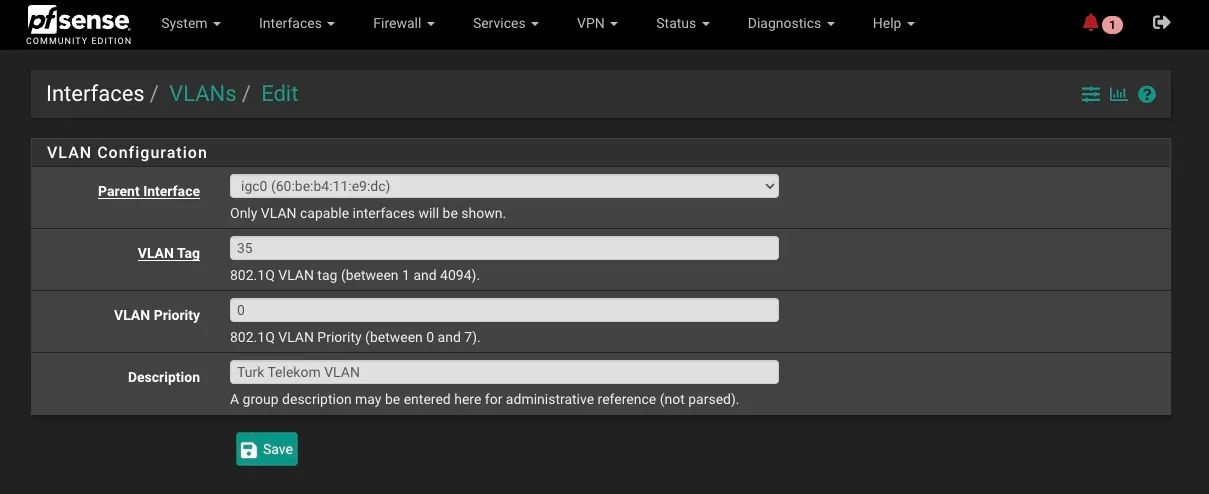
If you're using Superonline or another ISP that sets its VLAN to 0, you're going to need to do this by manually editing config files in pfSense since that's not a valid tag there.
Then update your new router's PPPoE config for WAN (not my real credentials don't worry)
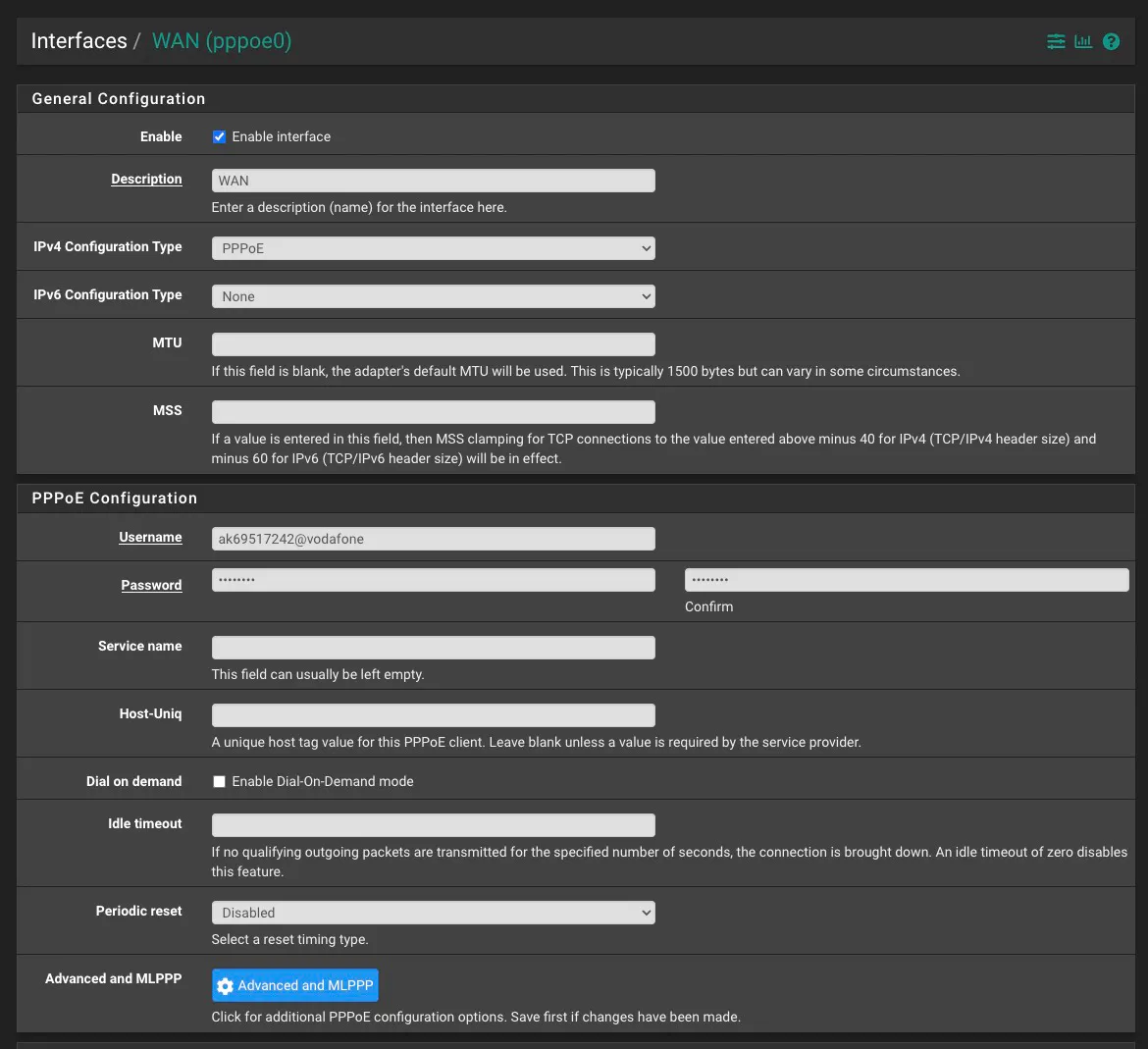
Your MAC address also needs to be updated but I can't for the life of me figure out how this is done in pfSense for WAN interfaces. So I've set it manually for igc0 using shell commands. I'm sure I'm just missing something obvious.
And that's it. If your router uses CHAP, you're going to need to crack the hash somehow. Knowing the pattern is going to be helpful for configuration. From my experimentation I've found that different Turkish ISPs have different password patterns, namely:
Superonlinedigits only[0-9]{10}Turk Telekomlowercase alphanumerical[0-9a-z]{10}
Which should take less than a day on modern GPUs. Let me know know if you have findings you'd like to share. I'd love to build a database of these findings.
If you don't or can't follow these instructions I've created a free and open source desktop application that can pretend to be a PPPoE server and do a full handshake to extract the right variables. I'd like to eventually turn this into a tool that works for all kinds of routers with different configurations.
Enjoyed reading?
Feel free to follow or reach out to me on Twitter 1 before it dies and I have to move to a different Twitter.